Onetera
Onetera
A Conversational AI assistant helping residents and staff navigate the complex landscape of government services
A Conversational AI assistant helping residents and staff navigate the complex landscape of government services

TIMELINE
FEB 2024 - Present
TEAM
3 Designers, 3 Engineers
TOOLS
Figma, Cursor
BACKGROUND
Onetera is a Los Angeles govtech company, founded in 2024, building an AI-native operating system for local government.
MY ROLE
Owned the resident-facing product experience, from research and co-design through interaction design and MVP prioritization. Defined the conversational AI experience and designed core application, eligibility, document, and post-submission workflows, partnering closely with engineering and the admin product team to develop scalable cross-product systems.
TIMELINE
FEB 2024 - Present
TEAM
3 Designers, 3 Engineers
TOOLS
Figma, Cursor
BACKGROUND
Onetera is a Los Angeles govtech company, founded in 2024, building an AI-native operating system for local government.
MY ROLE
Owned the resident-facing product experience, from research and co-design through interaction design and MVP prioritization. Defined the conversational AI experience and designed core application, eligibility, document, and post-submission workflows, partnering closely with engineering and the admin product team to develop scalable cross-product systems.
PROBLEM
Government services are fragmented by design.
Government services are fragmented by design.
Residents often have to navigate different departments, forms, websites, and documentation just to complete one government process. On the other side, staff spend hours chasing missing documents, answering the same questions, and piecing together information from different systems.
The challenge wasn’t just digitizing another government form. We needed to create an experience that could handle complex, jurisdiction-specific processes without overwhelming or confusing residents.
Residents often have to navigate different departments, forms, websites, and documentation just to complete one government process. On the other side, staff spend hours chasing missing documents, answering the same questions, and piecing together information from different systems.
The challenge wasn’t just digitizing another government form. We needed to create an experience that could handle complex, jurisdiction-specific processes without overwhelming or confusing residents.
HMW
How might we make government feel like one conversation instead of a maze of departments, forms, and offices?
How might we make government feel like one conversation instead of a maze of departments, forms, and offices?
SOLUTION
Navigating complex government processes through a conversation.
Navigating complex government processes through a conversation.
Residents explain their situation by phone or on a laptop using everyday language. The platform then matches them to the right programs, documents, and departments automatically and guides them through the application process - answering any questions, reviewing documents, and tracking their status along the way.
Staff get immediate access to residents' submissions with initial reviews, compliance details, and reporting already completed. They can add new programs—like grants or permits—one at a time alongside their existing tools. This means no expensive system overhauls, and resident data stays safe on the city’s own network.
Residents explain their situation by phone or on a laptop using everyday language. The platform then matches them to the right programs, documents, and departments automatically and guides them through the application process - answering any questions, reviewing documents, and tracking their status along the way. Staff get immediate access to residents’ submissions with initial reviews, compliance details, and reporting already completed. They can add new programs—like grants or permits—one at a time alongside their existing tools. This means no expensive system overhauls, and resident data stays safe on the city’s own network.
Together, these decisions turned a fragmented process into one clear flow. Residents knew what was needed and why, and staff spent less time following up on incomplete submissions.
Together, these decisions turned a fragmented process into one clear flow. Residents knew what was needed and why, and staff spent less time following up on incomplete submissions.
Minute completion of application compared to a few days
Percent reduction in administrative time
Applications submitted in <10 days compared to three a month
SOLUTION 01
24/7 conversational AI guidance
24/7 conversational AI guidance
Many people are unsure where to start when engaging with government processes. Available online resources are often outdated, generic, and scattered across platforms. As a result, people often turn to in-person visits for help.
To solve this, I designed the platform’s AI assistant to answer residents’ questions about eligibility, required steps, and necessary documents. It connects them to the right programs and guides them through the full application, from start to finish. That cuts down the calls and emails overwhelming the front desk and gives residents a simpler, more reliable way through the process.
Many people are unsure where to start when engaging with government processes. Available online resources are often outdated, generic, and scattered across platforms. As a result, people often turn to in-person visits for ahelp.
To solve this, I designed the platform's AI assistant to answer residents' questions about eligibility, required steps, and necessary documents. It connects them to the right programs and guides them through the full application, from start to finish. That cuts down the calls and emails overwhelming the front desk and gives residents a simpler, more reliable way through the process.
View Conversational AI Feature

SOLUTION 03
AI powered document review
AI powered document review
Another major friction point was document submission. The biggest delays in application review often come from inaccurate or missing documentation, typically because sorting through pages of dense code is cumbersome or it's unclear what "correct" looks like.
To solve for this, I designed a document analysis feature that analyzes documents, like construction plans for building permit applications, against hundreds of ingested building code documents. It returns a grade with reasoning and sources, so residents see exactly where a document failed and how to fix it.
Each jurisdiction and document type had its own requirements, so we built a configurable review model instead of a custom solution per city, flexible enough to handle jurisdiction differences, but consistent enough that residents got the same quality of feedback everywhere.
Another major friction point was document submission. The biggest delays in application review often come from inaccurate or missing documentation, typically because sorting through pages of dense code is cumbersome or it’s unclear what “correct” looks like. To solve for this, our platform analyzes documents, like construction plans for building permit applications, against hundreds of ingested building code documents. It returns a grade with reasoning and sources, so residents see exactly where a document failed and how to fix it. Each jurisdiction and document type had its own requirements, so we built a configurable review model instead of a custom solution per city, flexible enough to handle jurisdiction differences, but consistent enough that residents got the same quality of feedback everywhere.
View Document Analysis Feature
SOLUTION 04
Post submission task handling
Post submission task handling
After a resident submits an application, they typically get tasks to complete, like uploading a missing document or revising a plan. Normally, that means emailing documents back and forth or going to city hall to resolve issues as they come up.
Our platform streamlines that experience with timely notifications, resolving the action in a few clicks with real-time validation, and storing everything in the application as the source of truth.
After a resident submits an application, they typically get tasks to complete, like uploading a missing document or revising a plan. Normally, that means emailing documents back and forth or going to city hall to resolve issues as they come up. Our platform streamlines that experience with timely notifications, resolving the action in a few clicks with real-time validation, and storing everything in the application as the source of truth.
View Action Required Feature
PRINCIPLES
Design Principles
Design Principles
Trust
Residents always know what the AI is doing and why, with clear sources, plain-language explanations, and a person to turn to when they need one.
Accessibility
Many of our users were in vulnerable populations, so we needed to ensure to consider their needs.
Ease of use
Complex government processes become guided, one-step-at-a-time flows that never assume residents already know the system.
Trust
Residents always know what the AI is doing and why, with clear sources, plain-language explanations, and a person to turn to when they need one.
Accessibility
Many of our users were in vulnerable populations, so we needed to ensure to consider their needs.
Ease of use
Complex government processes become guided, one-step-at-a-time flows that never assume residents already know the system.
RESEARCH
Research overview
Research overview
Co-design sessions
Worked directly with key public sector stakeholders to pulse-check the most pressing issues city staff face, shaping which use cases we prioritized in the earliest stages of the product.
Intro meetings and walkthroughs
Regular demos with city partners surface real-time reactions and uncover new gaps as we scale.
Embedded partnership
Deployed El Monte's rental assistance program and took on a customer support role to experience admin workflows firsthand.
Usability testing
Tested new features, layouts, and interactions to make sure they were intuitive before release.
Co-design sessions
Worked directly with key public sector stakeholders to pulse-check the most pressing issues city staff face, shaping which use cases we prioritized in the earliest stages of the product.
Intro meetings and walkthroughs
Regular demos with city partners surface real-time reactions and uncover new gaps as we scale.
Embedded partnership
Deployed El Monte's rental assistance program and took on a customer support role to experience admin workflows firsthand.
Usability testing
Tested new features, layouts, and interactions to make sure they were intuitive before release.
RESEARCH
Early findings through collaborative design sessions
Early findings through collaborative design sessions
Our goal in these codesign sessions was to understand the most pressing issues facing government staff and the constituents they serve, so we could build the MVP around real user needs. I led collaborative design activities to surface pain points in existing workflows, map current processes, audit the tools in use, and identify gaps our product could fill.
Our goal in these codesign sessions was to understand the most pressing issues facing government staff and the constituents they serve, so we could build the MVP around real user needs. I led collaborative design activities to surface pain points in existing workflows, map current processes, audit the tools in use, and identify gaps our product could fill.
4
4
Co-Design sessions spanning 4 months
Co-Design sessions spanning 4 months
5-8
5-8
key public sector stakeholders
key public sector stakeholders

FINDINGS
Four themes emerged from our research
Four themes emerged from our research
Each developer posted listings and managed waitlists differently, leaving residents without a centralized place to find and track opportunities.
After submitting an application, applicants often had little visibility into their status or where they stood in the process, creating uncertainty and prompting calls and emails to city staff.
Services were often available in only a few languages, translators were expensive to hire, and residents frequently had to visit city offices in person to get help or apply.
Online resources were often outdated or too broad to address residents' specific circumstances, leaving them to figure out eligibility and next steps themselves.
Services were fragmented
Each developer posted listings and managed waitlists differently, leaving residents without a centralized place to find and track opportunities.
Residents lacked visibility
After submitting an application, applicants often had little visibility into their status or where they stood in the process, creating uncertainty and prompting calls and emails to city staff.
Access was limited
Services were often available in only a few languages, translators were expensive to hire, and residents frequently had to visit city offices in person to get help or apply.
Information was generic
Online resources were often outdated or too broad to address residents' specific circumstances, leaving them to figure out eligibility and next steps themselves.
Each developer posted listings and managed waitlists differently, leaving residents without a centralized place to find and track opportunities.
After submitting an application, applicants often had little visibility into their status or where they stood in the process, creating uncertainty and prompting calls and emails to city staff.
Services were often available in only a few languages, translators were expensive to hire, and residents frequently had to visit city offices in person to get help or apply.
Online resources were often outdated or too broad to address residents' specific circumstances, leaving them to figure out eligibility and next steps themselves.
Services were fragmented
Each developer posted listings and managed waitlists differently, leaving residents without a centralized place to find and track opportunities.
Residents lacked visibility
After submitting an application, applicants often had little visibility into their status or where they stood in the process, creating uncertainty and prompting calls and emails to city staff.
Access was limited
Services were often available in only a few languages, translators were expensive to hire, and residents frequently had to visit city offices in person to get help or apply.
Information was generic
Online resources were often outdated or too broad to address residents' specific circumstances, leaving them to figure out eligibility and next steps themselves.
SYNTHESIS
These findings pointed to a bigger problem: government services weren't difficult only because individual forms were poorly designed. The entire journey was fragmented. Residents had to piece together information, determine what applied to them, complete forms, submit documents, and follow up across disconnected systems.
This shaped our early product direction: rather than designing another collection of government forms, we explored what an AI-native platform could look like if it could guide residents through the entire journey.
These findings pointed to a bigger problem: government services weren’t difficult only because individual forms were poorly designed. The entire journey was fragmented. Residents had to piece together information, determine what applied to them, complete forms, submit documents, and follow up across disconnected systems. This shaped our early product direction: rather than designing another collection of government forms, we explored what an AI-native platform could look like if it could guide residents through the entire journey.
INITIAL ITERATIONS
INITIAL ITERATIONS
Initial concepts of our conversational AI interface
Initial concepts of our conversational AI interface
Building the conversational experience was one of our earliest product challenges. Few products had established patterns for AI-native government services, so I had to define how conversation could work alongside the structured information residents needed.
I focused on three questions: how information should appear in conversation, how users discover what they can ask, and how they return to information they've already seen.
Chat has a specific weakness: information gets lost, nothing jogs users toward the next question, and nothing lets them browse back through. To address this, I designed artifact cards which were compact previews for visually dense content that could open into a persistent side panel, letting residents explore detail without losing conversation context. I also gave every artifact a permanent home outside the chat (a submissions page, a program library), so residents always had a reliable place to return to.
These decisions set an early principle for the platform: conversation could be the entry point, but it didn't need to carry everything.
Building the conversational experience was one of our earliest product challenges. Few products had established patterns for AI-native government services, so I had to define how conversation could work alongside the structured information residents needed. I focused on three questions: how information should appear in conversation, how users discover what they can ask, and how they return to information they’ve already seen. Chat has a specific weakness: information gets lost, nothing jogs users toward the next question, and nothing lets them browse back through. To address this, I designed artifact cards which were compact previews for visually dense content that could open into a persistent side panel, letting residents explore detail without losing conversation context. I also gave every artifact a permanent home outside the chat (a submissions page, a program library), so residents always had a reliable place to return to. These decisions set an early principle for the platform: conversation could be the entry point, but it didn’t need to carry everything.

INITIAL ITERATIONS
INITIAL ITERATIONS
Initial concepts of our program application
Initial concepts of our program application
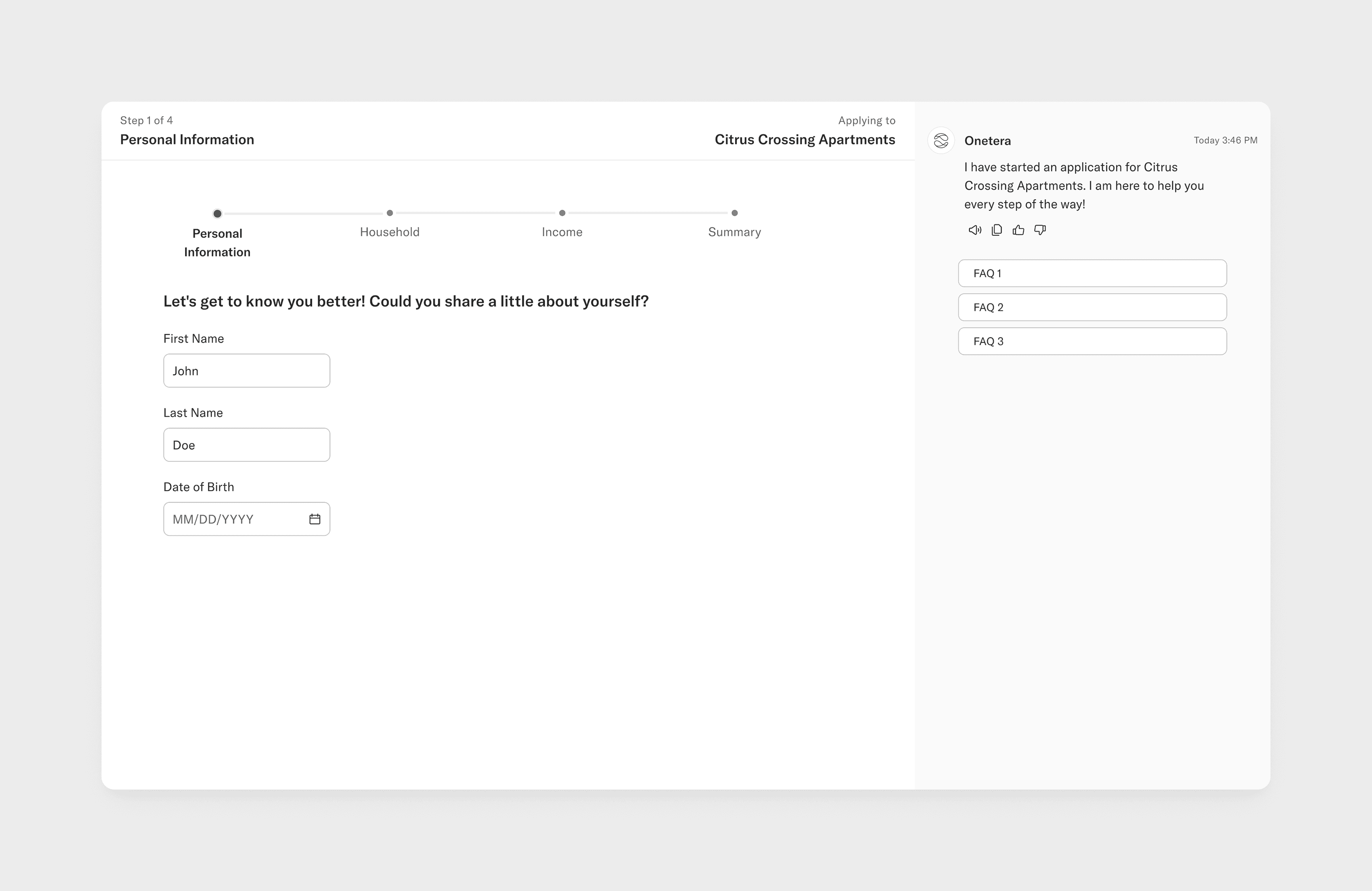
The tension between conversational AI and traditional UX persisted into the program application experience. I designed a split view that paired the application form with the conversational AI, allowing the AI to act as an assistant throughout the process—helping users navigate the application and asking relevant questions along the way.
Suggested prompts were tailored to the page the user was on, making the AI feel contextual rather than like a separate, general-purpose chatbot.
The tension between conversational AI and traditional UX persisted into the program application experience. I designed a split view that paired the application form with the conversational AI, allowing the AI to act as an assistant throughout the process—helping users navigate the application and asking relevant questions along the way.
Suggested prompts were tailored to the page the user was on, making the AI feel contextual rather than like a separate, general-purpose chatbot.
LAUNCH
Partnership with the city of El Monte
Partnership with the city of El Monte
We partnered with the City of El Monte to deploy its rental assistance program, which provides low-income renters with a one-time rent payment.
This was the first time residents would use our product in a live setting. To prepare for launch, I led multiple design sessions, interviews, and prototype walkthroughs with residents and city staff to identify gaps and validate the end-to-end experience.
We partnered with the City of El Monte to deploy its rental assistance program, which provides low-income renters with a one-time rent payment. This was the first time residents would use our product in a live setting. To prepare for launch, I led multiple design sessions, interviews, and prototype walkthroughs with residents and city staff to identify gaps and validate the end-to-end experience.

FINDINGS
Key insights
Key insights
Most staff time went toward requesting missing documents, cross-checking applications against submissions, and resolving discrepancies.
There was no effective way to use application data for decision-making. Each administrator developed their own workaround—for example, tracking demographic information in a separate Excel sheet.
Eligibility wasn't always straightforward. Residents often had circumstances that required personalized guidance, leading to a high volume of phone calls and emails to staff.
Staff spent significant time fixing incomplete applications
Most staff time went toward requesting missing documents, cross-checking applications against submissions, and resolving discrepancies.
Applicant data wasn't being used systematically
There was no effective way to use application data for decision-making. Each administrator developed their own workaround—for example, tracking demographic information in a separate Excel sheet.
Residents needed support for unique situations
Eligibility wasn't always straightforward. Residents often had circumstances that required personalized guidance, leading to a high volume of phone calls and emails to staff.
Most staff time went toward requesting missing documents, cross-checking applications against submissions, and resolving discrepancies.
There was no effective way to use application data for decision-making. Each administrator developed their own workaround—for example, tracking demographic information in a separate Excel sheet.
Eligibility wasn't always straightforward. Residents often had circumstances that required personalized guidance, leading to a high volume of phone calls and emails to staff.
Staff spent significant time fixing incomplete applications
Most staff time went toward requesting missing documents, cross-checking applications against submissions, and resolving discrepancies.
Applicant data wasn't being used systematically
There was no effective way to use application data for decision-making. Each administrator developed their own workaround—for example, tracking demographic information in a separate Excel sheet.
Residents needed support for unique situations
Eligibility wasn't always straightforward. Residents often had circumstances that required personalized guidance, leading to a high volume of phone calls and emails to staff.
RESEARCH
Determining what MVP means
Determining what MVP means
Based on our research findings, I led an ideation and feature-prioritization workshop with my founder, the other designer, and our engineering team to determine what would be in scope for launch.
I involved engineers early so we could evaluate technical feasibility alongside user impact. We mapped features on an impact-versus-effort matrix, weighing each against our launch goals and the resident and admin pain points identified in research.
This gave the team a shared framework for making trade-offs and helped us focus the MVP on the features most likely to address the highest-impact problems.
Based on our research findings, I led an ideation and feature-prioritization workshop with my founder, the other designer, and our engineering team to determine what would be in scope for launch. I involved engineers early so we could evaluate technical feasibility alongside user impact. We mapped features on an impact-versus-effort matrix, weighing each against our launch goals and the resident and admin pain points identified in research. This gave the team a shared framework for making trade-offs and helped us focus the MVP on the features most likely to address the highest-impact problems.

In scope for launch
Onboarding
To move away from the generic, one-size-fits-all resources residents were used to, we prioritized an intuitive onboarding process that personalizes the experience to each applicant.
Eligibility checker
Ineligible applications were one of the biggest pain points, with people unsure whether they qualified at all. An eligibility checker was low cost to build and had a big impact on reducing that friction upfront.
Deferred to a later release
Document OCR
The engineering lift was too large to build in time. We invested in quick wins on the discovery end instead, which we hoped would reduce the number of incorrect documents coming in.
Actions required
Surfacing actions to residents depends on admins using the platform on their end. Since that buy-in wasn't confirmed yet, we held this for a later release.
DESIGNS
Designing onboarding: balancing required info against drop-off risk
Designing onboarding: balancing required info against drop-off risk
I designed an onboarding flow to capture the minimum information needed to personalize the resident experience. The challenge was deciding what was important enough to require without creating unnecessary friction, so I kept onboarding to fewer than five questions.
I prioritized information that could unlock value across multiple programs, such as eligibility criteria, alongside information essential to using the product, such as language preference. This gave us a lightweight foundation for personalization without turning onboarding into another government form.
I designed an onboarding flow to capture the minimum information needed to personalize the resident experience. The challenge was deciding what was important enough to require without creating unnecessary friction, so I kept onboarding to fewer than five questions.
I prioritized information that could unlock value across multiple programs, such as eligibility criteria, alongside information essential to using the product, such as language preference. This gave us a lightweight foundation for personalization without turning onboarding into another government form.
DESIGNS
Adding instant, personalized eligibility guidance to the program page
Adding instant, personalized eligibility guidance to the program page
I redesigned the program page to surface eligibility upfront, using information from onboarding to determine whether a resident qualified for the program.
Rather than asking residents to interpret a generic list of requirements, the experience personalized the guidance to their circumstances. If they were ineligible, it explained which requirement they didn't meet, helping them understand not just the outcome, but why.
I redesigned the program page to surface eligibility upfront, using information from onboarding to determine whether a resident qualified for the program.
Rather than asking residents to interpret a generic list of requirements, the experience personalized the guidance to their circumstances. If they were ineligible, it explained which requirement they didn't meet, helping them understand not just the outcome, but why.
DESIGNS
Iterating on document submission: bulk upload vs. guided upload
Iterating on document submission: bulk upload vs. guided upload
I explored two approaches for document submission. My initial direction was a bulk upload flow where the system would automatically map uploaded documents to the appropriate categories.
The goal was to reduce steps and match how people typically prepare documents: gather everything they need, then upload it all at once. This seemed like the lowest-friction approach, while shifting the categorization work from the resident to the system.
I explored two approaches for document submission. My initial direction was a bulk upload flow where the system would automatically map uploaded documents to the appropriate categories. The goal was to reduce steps and match how people typically prepare documents: gather everything they need, then upload it all at once. This seemed like the lowest-friction approach, while shifting the categorization work from the resident to the system.
DESIGNS
Landing on individual upload buttons per requirement
Landing on individual upload buttons per requirement
I ultimately gave each document requirement its own upload step. While this added more interaction, it reduced the risk of mapping errors, particularly for documents that could satisfy multiple requirements.
Usability testing also showed that a step-by-step flow was easier for less tech-savvy users to navigate. The additional guidance helped residents understand what was needed and where each document belonged, making the process more predictable and manageable.
I ultimately gave each document requirement its own upload step. While this added more interaction, it reduced the risk of mapping errors, particularly for documents that could satisfy multiple requirements.
Usability testing also showed that a step-by-step flow was easier for less tech-savvy users to navigate. The additional guidance helped residents understand what was needed and where each document belonged, making the process more predictable and manageable.
RESEARCH
Post-launch customer support
Post-launch customer support
We hosted workshops to help residents onboard to the platform and answer their questions. We also stepped into a customer support role and resolved resident requests directly.
This gave us firsthand exposure to the review process, revealing the friction residents encountered and the manual workarounds admins relied on.
We hosted workshops to help residents onboard to the platform and answer their questions. We also stepped into a customer support role and resolved resident requests directly. This gave us firsthand exposure to the review process, revealing the friction residents encountered and the manual workarounds admins relied on.

FINDINGS
Patterns we uncovered
Patterns we uncovered
Applicants had unconventional income sources, making it unclear what documentation counted as proof of income.
Payment information often didn't match the supporting documentation.
Applicants frequently uploaded the wrong document for a requirement—for example, a driver's license as proof of citizenship.
Applicants still had scenario-specific questions, but many weren't using the chat to ask them.
Applicants had unconventional income sources, making it unclear what documentation counted as proof of income.
Payment information often didn’t match the supporting documentation.
Applicants frequently uploaded the wrong document for a requirement—for example, a driver’s license as proof of citizenship.
Applicants still had scenario-specific questions, but many weren’t using the chat to ask them.
FEATURE INTRODUCTION
Evolution of our conversational AI
Evolution of our conversational AI
We shifted the entire application to better align with our mission and give residents the flexibility and hand-holding they need. We iterated on the side panel and AI assistant roles, continuously testing and incorporating feedback until we landed on our final hybrid approach.
We shifted the entire application to better align with our mission and give residents the flexibility and hand-holding they need. We iterated on the side panel and AI assistant roles, continuously testing and incorporating feedback until we landed on our final hybrid approach.
PROMPT ENGINEERING
Prompt engineering for conversational edge cases
Prompt engineering for conversational edge cases
I designed how the conversational agent should handle edge cases like gibberish, casual small talk, and unsupported questions. For each, I defined detection criteria, response protocols, example phrasing, and boundaries to prevent false triggers.
I then tested the live agent against these expectations, comparing its responses to the intended behavior and using the gaps to iteratively refine the prompts.
I designed how the conversational agent should handle edge cases like gibberish, casual small talk, and unsupported questions. For each, I defined detection criteria, response protocols, example phrasing, and boundaries to prevent false triggers.
I then tested the live agent against these expectations, comparing its responses to the intended behavior and using the gaps to iteratively refine the prompts.

ITERATIONS
Designing the conversational application
Designing the conversational application
We shifted the application experience to a fully conversational model, aligning with our mission to make applying feel like a conversation.
This introduced three core design challenges:
Tracking: helping users keep track of information they had already provided as it became buried in the conversation
Editing: giving users a way to revisit and change previous responses
Orientation: helping users understand where they were in the application without traditional UI patterns like progress trackers
We shifted the application experience to a fully conversational model, aligning with our mission to make applying feel like a conversation.
This introduced three core design challenges:
Tracking: helping users keep track of information they had already provided as it became buried in the conversation
Editing: giving users a way to revisit and change previous responses
Orientation: helping users understand where they were in the application without traditional UI patterns like progress trackers
ITERATIONS
The side panel as source of truth
The side panel as source of truth
To solve these challenges, I used the side panel as a persistent source of truth for the application.
The panel auto-filled as users responded, giving them a persistent view of the information they provided.
Users could edit or add information directly in the panel if they couldn't or didn't want to use the AI.
The section states (completed, active, upcoming) showed users where they were in the application, eliminating the need for a separate progress tracker.
To solve these challenges, I used the side panel as a persistent source of truth for the application.
The panel auto-filled as users responded, giving them a persistent view of the information they provided.
Users could edit or add information directly in the panel if they couldn't or didn't want to use the AI.
The section states (completed, active, upcoming) showed users where they were in the application, eliminating the need for a separate progress tracker.
DESIGN REDIRECTION
Engineering constraints surfaced a deeper issue
Engineering constraints surfaced a deeper issue
Technical limitations made the conversational experience feel rigid in practice:
One response at a time: the chat couldn't handle parallel or batched inputs.
~15 seconds response time: each interaction added significant latency, effectively doubling application time compared to a traditional form.
The impact became clear in usability testing: many participants bypassed the chat entirely, using the side panel's edit functionality to complete the application through the forms. Even our own engineers did the same while testing.
This was a telling signal: the fallback was outperforming the primary conversational flow under the existing technical constraints.
Technical limitations made the conversational experience feel rigid in practice:
One response at a time: the chat couldn’t handle parallel or batched inputs.
~15-second response time: each interaction added significant latency, effectively doubling application time compared to a traditional form.
The impact became clear in usability testing: many participants bypassed the chat entirely, using the side panel’s edit functionality to complete the application through the forms. Even our own engineers did the same while testing.
This was a telling signal: the fallback was outperforming the primary conversational flow under the existing technical constraints.
FINAL DESIGNS
The decision: from conversational-first to hybrid
The decision: from conversational-first to hybrid
Based on these findings, I collaborated with the team to make a key product decision: deprecate the fully conversational application and pivot to a hybrid experience, redirecting engineering and design effort toward the side panel.
This became Guided / Unguided mode, giving users control over how they completed the application:
Guided conversational, AI-led experience
Unguided traditional form experience, with the chat persisting alongside it rather than driving the application
We further refined the experience based on city staff feedback, adding an expand/collapse control so users could hide the chat when the on-screen information felt overwhelming.
Based on these findings, I collaborated with the team to make a key product decision: deprecate the fully conversational application and pivot to a hybrid experience, redirecting engineering and design effort toward the side panel. This became Guided / Unguided mode, giving users control over how they completed the application: Guided — conversational, AI-led experience Unguided — traditional form experience, with the chat persisting alongside it rather than driving the application We further refined the experience based on city staff feedback, adding an expand/collapse control so users could hide the chat when the on-screen information felt overwhelming.
FEATURE INTRODUCTION
Evolution of document submission
Evolution of document submission
From basic document OCR to spatially analyzing construction plans, our document submission feature evolved to address the needs coming up from staff.
From basic document OCR to spatially analyzing construction plans, our document submission feature evolved to address the needs coming up from staff.
ITERATIONS
City staff needed a more advanced document analysis to address delays in the permit review process.
City staff needed a more advanced document analysis to address delays in the permit review process.
As more city partners joined, permitting became a major use case. Many cities faced high kickback rates from plans that didn't comply with building codes, delaying permit review.
Spatial analysis addressed this by evaluating plans against ingested building code and zoning requirements, including criteria like lot coverage and setbacks. But giving AI the ability to make compliance judgments introduced a new design challenge: trust.
Staff's biggest concern was a confidently wrong answer being treated as fact. Transparency and restraint became the principles guiding how far the AI could go without human review.
Reasoning and sources: Every finding showed its reasoning. It linked to the exact building code or zoning requirement behind it, allowing applicants and staff to verify results rather than take them on faith.
Confidence as a gate, not a label: Confidence scoring didn't just appear in the UI; it determined the verdict. The threshold for an automatic pass was intentionally high, while ambiguous results were routed to review. We prioritized false negatives over false positives because an overly confident AI judgment carried greater risk.
A taxonomy that mirrored the code: Findings were structured around the building code itself, organizing results in a way that matched how staff already thought about compliance.
As more city partners joined, permitting became a major use case. Many cities faced high kickback rates from plans that didn't comply with building codes, delaying permit review.
Spatial analysis addressed this by evaluating plans against ingested building code and zoning requirements, including criteria like lot coverage and setbacks. But giving AI the ability to make compliance judgments introduced a new design challenge: trust.
Staff's biggest concern was a confidently wrong answer being treated as fact. Transparency and restraint became the principles guiding how far the AI could go without human review.
Reasoning and sources: Every finding showed its reasoning. It linked to the exact building code or zoning requirement behind it, allowing applicants and staff to verify results rather than take them on faith.
Confidence as a gate, not a label: Confidence scoring didn't just appear in the UI; it determined the verdict. The threshold for an automatic pass was intentionally high, while ambiguous results were routed to review. We prioritized false negatives over false positives because an overly confident AI judgment carried greater risk.
A taxonomy that mirrored the code: Findings were structured around the building code itself, organizing results in a way that matched how staff already thought about compliance.

USER FLOWS
Mapping every way a document upload could fail
Mapping every way a document upload could fail
To make sure we addressed more than the happy path, I mapped every way a document upload could go wrong: low-quality scans, documents the AI couldn't categorize, miscategorized documents, and incorrect document types.
Mapping these edge cases first let me pressure-test the logic with engineering before visual design began. It also surfaced gaps in the system, like what should happen to orphaned documents after a correction, before they became UI problems.
To make sure we addressed more than the happy path, I mapped every way a document upload could go wrong: low-quality scans, documents the AI couldn't categorize, miscategorized documents, and incorrect document types.
Mapping these edge cases first let me pressure-test the logic with engineering before visual design began. It also surfaced gaps in the system, like what should happen to orphaned documents after a correction, before they became UI problems.

ITERATIONS
Expanding document analysis to handle multiple analyses at once
Expanding document analysis to handle multiple analyses at once
Partnering with El Salvador exposed the next gap. Many applications required reviewing multiple documents together, but the system was built around independent, single-document analyses. Reviewing five documents meant five separate reports—an unnecessarily cumbersome experience.
I designed a multi-document analysis system that could run once across an entire document packet and consolidate the results into a single report view.
This introduced a new systems challenge: each analysis had its own status schema, requirements, and gating logic. I needed to unify them into a single status model while preserving each analysis's underlying states. It also meant rethinking the document component, which now needed to communicate two distinct statuses: the preliminary check and the analysis result.
Partnering with El Salvador exposed the next gap. Many applications required reviewing multiple documents together, but the system was built around independent, single-document analyses. Reviewing five documents meant five separate reports—an unnecessarily cumbersome experience. I designed a multi-document analysis system that could run once across an entire document packet and consolidate the results into a single report view. This introduced a new systems challenge: each analysis had its own status schema, requirements, and gating logic. I needed to unify them into a single status model while preserving each analysis’s underlying states. It also meant rethinking the document component, which now needed to communicate two distinct statuses: the preliminary check and the analysis result.
USER FLOWS
Understanding how the user flow would evolve
Understanding how the user flow would evolve
Before designing the next iteration of multi-document analysis, I mapped how the flow should evolve after a document was categorized. The key question was how each document would be evaluated against its requirements.
A binary pass/fail model wasn't enough, so I defined more granular states: when a warning should surface versus a blocking failure, how overrides should be confirmed and logged rather than silently changing the record, and how a re-upload should trigger a fresh analysis that replaces the previous result rather than stacking on top of it.
Before designing the next iteration of multi-document analysis, I mapped how the flow should evolve after a document was categorized. The key question was how each document would be evaluated against its requirements.
A binary pass/fail model wasn't enough, so I defined more granular states: when a warning should surface versus a blocking failure, how overrides should be confirmed and logged rather than silently changing the record, and how a re-upload should trigger a fresh analysis that replaces the previous result rather than stacking on top of it.

FEATURE WALKTHROUGH
Part 1: designing the different states of the document card
Part 1: designing the different states of the document card
INITIAL DESIGN
Batch analysis created a new state
Batch analysis created a new state
Running analysis on all documents at once meant some only needed a quick preliminary check, while others needed a full analysis.
My first pass showed each result in a different place:
Preliminary check → shown in the file component.
Full analysis → shown on the document card as a checkmark or warning, but only after the whole batch finished.
That delay caused the problem. A document already verified by its preliminary check sat unmarked until every other document finished, then got the same checkmark. It looked like it had gone through full analysis when it hadn’t.
Running analysis on all documents at once meant some only needed a quick preliminary check, while others needed a full analysis.
My first pass showed each result in a different place:
Preliminary check → shown in the file component.
Full analysis → shown on the document card as a checkmark or warning, but only after the whole batch finished.
That delay caused the problem. A document already verified by its preliminary check sat unmarked until every other document finished, then got the same checkmark. It looked like it had gone through full analysis when it hadn’t
FINAL DESIGN
Separating analysis states in the UI
Separating analysis states in the UI
The existing statuses couldn’t tell apart a document that was finished after its preliminary check and one that still needed full analysis. So I added a new one: ready for analysis, for documents that passed the preliminary check but were still waiting on full analysis.
From there, each document took one of two paths:
Preliminary check only → moved straight to verified.
Full analysis → moved to ready for analysis, then to verified or warning once the analysis ran.
Now every status shows exactly where a document is and whether anything is left to do.
The existing statuses couldn’t tell apart a document that was finished after its preliminary check and one that still needed full analysis. So I added a new one: ready for analysis, for documents that passed the preliminary check but were still waiting on full analysis.
From there, each document took one of two paths:
Preliminary check only → moved straight to verified.
Full analysis → moved to ready for analysis, then to verified or warning once the analysis ran.
Now every status shows exactly where a document is and whether anything is left to do.
FEATURE WALKTHROUGH
Part 2: designing a more flexible and transparent loading experience
Part 2: designing a more flexible and transparent loading experience
FINAL DESIGN
Designing for long analysis times
Designing for long analysis times
In testing, users struggled with the generic loading state we’d used for analysis, which could take up to 15 minutes.
Two things stood out:
They felt anxious not knowing how long was left.
They felt stuck, since they couldn’t move forward until it finished.
I made two changes to address each:
Progress visibility → a completion percentage and elapsed time, so users could see progress and estimate what was left.
Freedom to move on → a collapsed loading view, so users could keep filling out the application and get notified when analysis finished.
In testing, users struggled with the generic loading state we’d used for analysis, which could take up to 15 minutes.
Two things stand out:
They felt anxious not knowing how long was left.
They felt stuck, since they couldn’t move forward until it finished.
I made two changes to address each:
Progress visibility → a completion percentage and elapsed time, so users could see progress and estimate what was left.
Freedom to move on → a collapsed loading view, so users could keep filling out the application and get notified when analysis finished.
FEATURE WALKTHROUGH
Part 3: designing a report view that aligns with the mental model of the user
Part 3: designing a report view that aligns with the mental model of the user
INITIAL DESIGN
Structuring the report around how I expected users to review it
Structuring the report around how I expected users to review it
My initial assumption was that applicants would review the report one document at a time, working through findings in order.
I built the layout around that:
Each document requirement became its own section in the table.
Clicking a section filtered the analysis report to show only that document’s results.
The goal was focus. Instead of facing every finding at once, applicants would only see what applied to the document in front of them.
My initial assumption was that applicants would review the report one document at a time, working through findings in order.
I built the layout around that:
Each document requirement became its own section in the table.
Clicking a section filtered the analysis report to show only that document’s results.
The goal was focus. Instead of facing every finding at once, applicants would only see what applied to the document in front of them.

FINAL DESIGNS
Restructuring the report around how users actually reviewed it
Restructuring the report around how users actually reviewed it
Stress-testing with real documents and feedback from city staff revealed two gaps:
Redundant results → one requirement could touch multiple documents across different slots, so the same result appeared in several sections.
Mismatched mental models → users looked at findings first, then figured out which document each one applied to. Starting from the document didn’t match how they worked, and the dynamic filtering frustrated users who just wanted to see everything at once.
So I flipped the structure:
All results show by default, each labeled with the documents it touches.
Filtering by document is optional, not the starting point.
Stress-testing with real documents and feedback from city staff revealed two gaps:
Redundant results → one requirement could touch multiple documents across different slots, so the same result appeared in several sections.
Mismatched mental models → users looked at findings first, then figured out which document each one applied to. Starting from the document didn’t match how they worked, and the dynamic filtering frustrated users who just wanted to see everything at once
So I flipped the structure:
All results show by default, each labeled with the documents it touches.
Filtering by document is optional, not the starting point.

FEATURE INTRODUCTION
Evolution of actions required
Evolution of actions required
Our Actions Required feature wasn't built for residents. But as we grew our partnerships, the pain points around post-submission task completion grew with it, and we knew it needed to evolve to meet residents' needs.
Our Actions Required feature wasn't built for residents. But as we grew our partnerships, the pain points around post-submission task completion grew with it, and we knew it needed to evolve to meet residents' needs.
CURRENT STATE
Current state of actions required
Current state of actions required
Actions required are tasks that city staff assigns to residents to complete during the application review process. These include uploading a missing document, correcting a plan, getting a signature, and paying a fee. The original version was admin-only, designed for internal cross-departmental task visibility, and didn't account for residents at all. It also didn't address related action-required items. For instance, 10 revisions to a permit plan would become 10 individual action-required items, even though they are all related.
Actions required are tasks that city staff assigns to residents to complete during the application review process. These include uploading a missing document, correcting a plan, getting a signature, and paying a fee. The original version was admin-only, designed for internal cross-departmental task visibility, and didn't account for residents at all. It also didn't address related action-required items. For instance, 10 revisions to a permit plan would become 10 individual action-required items, even though they are all related.

IDEATION
Creating a standardized, scalable system for how required actions would get resolved
Creating a standardized, scalable system for how required actions would get resolved
Before designing anything, I needed logic to standardize and scale the feature—otherwise we'd end up building a one-off, manual solution for every use case.
I started with real examples of applicant actions required by the Government of El Salvador and mapped each one to an entity (question, form, document), action type, system action, and resolution.
Before designing anything, I needed logic to standardize and scale the feature—otherwise we’d end up building a one-off, manual solution for every use case. I started with real examples of applicant actions required by the Government of El Salvador and mapped each one to an entity (question, form, document), action type, system action, and resolution.

Despite the variety of action types, they all resolved through three system actions: document upload (with one caveat—some required spatial analysis), external action (payments, other permit applications), and form completion (missing information, etc.). I aligned with the admin designer on a schema capturing every action type and its resolution path.
Despite the variety of action types, they all resolved through three system actions: document upload (with one caveat—some required spatial analysis), external action (payments, other permit applications), and form completion (missing information, etc.). I aligned with the admin designer on a schema capturing every action type and its resolution path.

IDEATION
Determining how actions get grouped together
Determining how actions get grouped together
Next, I had to decide how to group Actions Required.
I first considered letting admins group actions manually, but with 20+ actions per review session, that wouldn't scale — and different admins could group the same actions differently. Since resolving one action in a group resolves the whole group, that inconsistency could change what a resident was agreeing to submit depending on who reviewed their case.
Instead, I grouped actions automatically by what they're about — a Site Plan, Property Deed, or other document or form — rather than leaving it to admin judgment. Each action already links to its entity when it's created, so the system could use that relationship to determine its group automatically.
For each group, I designed a parent component whose status depends entirely on its children — it can't be resolved until every child action is resolved. I also handled single-action groups: if a group contains only one action, the parent wrapper collapses into the individual card to avoid adding visual clutter without adding meaning, while the underlying data still treats it as a group.
One edge case remains: two different entities that are still related, like a plan revision that also needs an updated deed. These currently stay as separate groups, which could cause a similar double-submission problem. I want to test this against real cases before deciding whether it needs its own solution.
Next, I had to decide how to group Actions Required. I first considered letting admins group actions manually, but with 20+ actions per review session, that wouldn’t scale — and different admins could group the same actions differently. Since resolving one action in a group resolves the whole group, that inconsistency could change what a resident was agreeing to submit depending on who reviewed their case. Instead, I grouped actions automatically by what they’re about — a Site Plan, Property Deed, or other document or form — rather than leaving it to admin judgment. Each action already links to its entity when it’s created, so the system could use that relationship to determine its group automatically. For each group, I designed a parent component whose status depends entirely on its children — it can’t be resolved until every child action is resolved. I also handled single-action groups: if a group contains only one action, the parent wrapper collapses into the individual card to avoid adding visual clutter without adding meaning, while the underlying data still treats it as a group. One edge case remains: two different entities that are still related, like a plan revision that also needs an updated deed. These currently stay as separate groups, which could cause a similar double-submission problem. I want to test this against real cases before deciding whether it needs its own solution.

IDEATION
Where actions required lives in the platform
Where actions required lives in the platform
I explored where Actions Required should live, evaluating each option against two criteria: keeping residents in the right context and supporting tasks throughout the application lifecycle.
Standalone view — More room for tasks, but separates them from the application context.
Inline on the submissions page — Keeps tasks close to submission data, but only works for post-submission actions. Some actions, like an early signature request, can happen before submission.
Side panel tab — Keeps tasks alongside the conversation, submission data, and document context already associated with the application. The tradeoff was adding more information to an already dense panel.
I ultimately chose a side panel tab. It kept Actions Required alongside the conversation, application data, and documents already associated with the resident's application, while remaining available regardless of where they were in the workflow.
I explored where Actions Required should live, evaluating each option against two criteria: keeping residents in the right context and supporting tasks throughout the application lifecycle. Standalone view — More room for tasks, but separates them from the application context. Inline on the submissions page — Keeps tasks close to submission data, but only works for post-submission actions. Some actions, like an early signature request, can happen before submission. Side panel tab — Keeps tasks alongside the conversation, submission data, and document context already associated with the application. The tradeoff was adding more information to an already dense panel. I ultimately chose a side panel tab. It kept Actions Required alongside the conversation, application data, and documents already associated with the resident’s application, while remaining available regardless of where they were in the workflow.

FINAL DESIGNS
Resolving actions required
Resolving actions required
When a resident selects an Action Required, I designed an isolated view focused only on the task at hand. For document revisions, for example, the experience compares the re-uploaded plan against the requested changes, so the resident can clearly understand what they need to resolve.
After completing the task, residents return to their Actions Required view, which surfaces only unresolved items. This keeps the workflow focused on what still needs attention rather than making residents navigate a history of completed tasks.
When a resident selects an Action Required, I designed an isolated view focused only on the task at hand. For document revisions, for example, the experience compares the re-uploaded plan against the requested changes, so the resident can clearly understand what they need to resolve. After completing the task, residents return to their Actions Required view, which surfaces only unresolved items. This keeps the workflow focused on what still needs attention rather than making residents navigate a history of completed tasks.
LAUNCH
Culver City rental assistance program launch
Culver City rental assistance program launch
We launched the rental assistance program with Culver City. Many of the pain points they reported mirrored El Monte's, but Culver City wanted the full end-to-end journey — including the admin side — which brought features like Actions Required back to the top of the priority list.
We launched the rental assistance program with Culver City. Many of the pain points they reported mirrored El Monte's, but Culver City wanted the full end-to-end journey — including the admin side — which brought features like Actions Required back to the top of the priority list.

DESIGN
New design features
New design features
Eligibility Screener
Revisited the eligibility checker and expanded it into an interactive screener that could be completed on the non-logged-in platform, making it accessible to more users before they created an account.
Third party contributor
Allowing third parties — such as a landlord — to complete a section of an applicant's application and upload documents directly, without needing the applicant to relay information back and forth.
Eligibility Screener
Revisited the eligibility checker and expanded it into an interactive screener that could be completed on the non-logged-in platform, making it accessible to more users before they created an account.
Third party contributor
Allowing third parties — such as a landlord — to complete a section of an applicant's application and upload documents directly, without needing the applicant to relay information back and forth.
FEATURE INTRODUCTION
Eligibility screener
Eligibility screener
The eligibility screener started as a simple checklist with no real verification behind it. As we scaled to more programs, we rebuilt it into an interactive experience — adding real address and income verification, with the option to gate applicants who didn't qualify before they got to a full application.
The eligibility screener started as a simple checklist with no real verification behind it. As we scaled to more programs, we rebuilt it into an interactive experience — adding real address and income verification, with the option to gate applicants who didn't qualify before they got to a full application.
USER FLOWS
Eligibility screener user flow
Eligibility screener user flow
Once we separated the eligibility screener from the application, several edge cases needed to be worked through: Should each program have its own eligibility screener, or should one screener apply across all programs? What happens if a user exits mid-screener without creating an account—how does that data get saved?
I mapped out the flow and decided that creating a new application each time a user started a program was cleaner from a data perspective. Reusing an application carried risk: if a user could start a new program without going through the screener again, they'd have no visibility into their previous answers.
For users exiting mid-screener without an account, I added a login modal to the public-facing chat, prompting them to create an account so they wouldn't lose their progress. Screener submissions completed before login are treated as orphaned submissions and then linked to the user's account once they start a program.
Once we separated the eligibility screener from the application, several edge cases needed to be worked through: Should each program have its own eligibility screener, or should one screener apply across all programs? What happens if a user exits mid-screener without creating an account—how does that data get saved? I mapped out the flow and decided that creating a new application each time a user started a program was cleaner from a data perspective. Reusing an application carried risk: if a user could start a new program without going through the screener again, they’d have no visibility into their previous answers. For users exiting mid-screener without an account, I added a login modal to the public-facing chat, prompting them to create an account so they wouldn’t lose their progress. Screener submissions completed before login are treated as orphaned submissions and then linked to the user’s account once they start a program.

FINAL DESIGNS
Address validation and AMI results
Address validation and AMI results
I designed the eligibility screener to replace self-reported residency with address validation, giving the system a way to verify jurisdiction rather than relying on a yes/no response. Because eligibility rules vary by program, I made the outcome configurable: an out-of-jurisdiction address could either block submission or be flagged for staff review.
The bigger challenge was communicating AMI eligibility. My first design surfaced the applicant's AMI percentage alongside a pass/fail result, but testing showed that the raw percentage wasn't actionable. Applicants wanted to know three things: whether they qualified, what the income limit was, and how their income compared.
I redesigned the result to surface that information directly in the message, making the outcome immediately understandable and actionable rather than requiring applicants to interpret the underlying calculation.
I designed the eligibility screener to replace self-reported residency with address validation, giving the system a way to verify jurisdiction rather than relying on a yes/no response. Because eligibility rules vary by program, I made the outcome configurable: an out-of-jurisdiction address could either block submission or be flagged for staff review. The bigger challenge was communicating AMI eligibility. My first design surfaced the applicant’s AMI percentage alongside a pass/fail result, but testing showed that the raw percentage wasn’t actionable. Applicants wanted to know three things: whether they qualified, what the income limit was, and how their income compared. I redesigned the result to surface that information directly in the message, making the outcome immediately understandable and actionable rather than requiring applicants to interpret the underlying calculation.
FEATURE INTRODUCTION
Third-party contributor
Third-party contributor
Rental assistance applications sometimes need input from someone other than the applicant — like a landlord verifying tenancy. I designed a way for these third parties to contribute directly, without compromising the resident's privacy or control over their own application.
Rental assistance applications sometimes need input from someone other than the applicant — like a landlord verifying tenancy. I designed a way for these third parties to contribute directly, without compromising the resident's privacy or control over their own application.
FINAL DESIGNS
Designing for third-party access
Designing for third-party access
Landlords needed to complete their section of an applicant's application, but they weren't full users of the platform —just guests in someone else's file. The core design problem was giving them access to only their piece without the experience feeling broken or restrictive
I kept the existing application shell and relabeled it for the landlord context, rather than building a separate landlord product. Locked sections used a grey card treatment to distinguish "not yours to see" from a simple disabled state, with a status pill showing what was completed.
The bigger decision was how much of the applicant's file a landlord should actually see. Similar patterns—FAFSA's contributor model, background-check portals like Checkr—show a second party a simplified outcome rather than full internal detail. I applied the same logic here: landlords see a status pill on the resident's application, not the submitted documents themselves. So landlords have enough context to decide what to submit without access to applicants' information.
Landlords needed to complete their section of an applicant’s application, but they weren’t full users of the platform —just guests in someone else’s file. The core design problem was giving them access to only their piece without the experience feeling broken or restrictive I kept the existing application shell and relabeled it for the landlord context, rather than building a separate landlord product. Locked sections used a grey card treatment to distinguish “not yours to see” from a simple disabled state, with a status pill showing what was completed. The bigger decision was how much of the applicant’s file a landlord should actually see. Similar patterns—FAFSA’s contributor model, background-check portals like Checkr—show a second party a simplified outcome rather than full internal detail. I applied the same logic here: landlords see a status pill on the resident’s application, not the submitted documents themselves. So landlords have enough context to decide what to submit without access to applicants’ information.